Showing posts with label children's apps. Show all posts

Monday, 3 March 2014

#PigbyAndFriends our day at Aardman Animations for Pigby's Fair

Sponsored Post

Following on from receiving a handmade pig we were invited down to Bristol to Aardman Studios to see how they put together the new NatWest savings game for children Pigby's Fair. I was so excited about going to Aardman I drove to Bristol and back in a day! Just walking into the reception was amazing:

posing with the monkey from the Pirates and the Scientists

meeting Wallace and Grommit

bunnies from the curse of the Were Rabbit

But of course we were there to see about Pigby and not all the other Aardman creations! So we were taken up to the cinema for a presentation:

in Aardman Animations cinema

Wednesday, 30 October 2013

App Review: Room on the Broom

Sponsored Post

We were lucky enough to be allowed a free download of the Room on the Broom game. As a family we love the book and the TV show so the app is perfect for us.

There are a total of 8 games for your child to play all of which feature the characters from the book and the music from the TV show:

If you know the story well then lots of things will look very familiar:
Children earn medals on each game for increasing levels of difficulty:
 
 
Can you guess which image is represented by the stars in this one:

Altogether a delightful app to add to your family's collection, especially with it being halloween!


Wednesday, 2 October 2013

Review: Appen

Sponsored Post

My son loves using my tablet so I am keen to get him using educational apps and devices on it and not just play games! We were offered a chance to review the Appen which is an electronic pen for use with iPads and other tablet devices. The pen costs around £17 from most major toy retailers and the software can be downloaded from iTunes, Google Play or Amazon for free. 

The pen operates using sounds via the headphone socket. If like me you fail to notice that the children have switched the mute button on then the pen won't be fully functional! It has simple pictorial instructions to get you up and running. Then you can choose which age range you want to use:


Obviously we were trying out the 5plus as my son is in year 2 at school. There are a different sections to choose from: drawing, letters and numbers or games. The drawing app actually changes the width of the lines depending on the pressure applied:


It is easy to switch between the different drawing implements and there is an all important undo button! An app for children wouldn't be the same without stickers and there are plenty on this one:


Only thing is they go on top of the drawings and you can't draw on them.

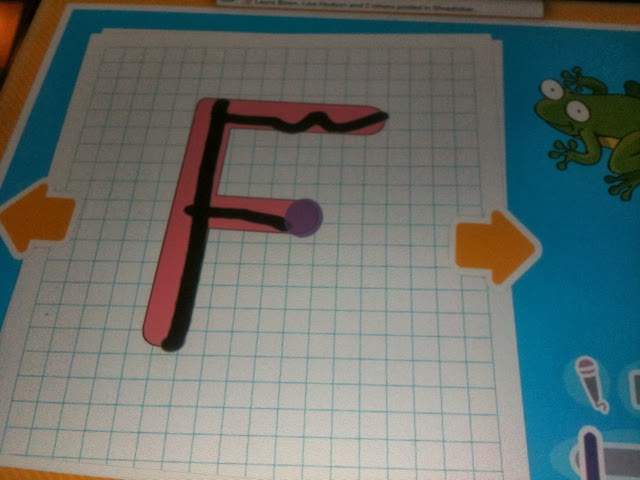
The next section was letters and numbers. There were a couple of different levels for each. The first letter game erased any mistakes and was very simple:


The circles show the child where to start writing from and where to go next. The second stage doesn't do so much correction on wobbly lines:


My son is a big numbers fan so having a couple of simple maths games is a good thing though I think he may already be well past the levels on this app. Firstly a simple counting game where the child clicks on the correct number and is awarded with a sweetie when right:


If a wrong answer is chosen then this little character pops up:


A full house of correct answers is rewarded with a celebration:


The second level is a game where the child has to click on the picture that matches the number:


Finally there is a games section though not all the games are as yet available. A shame as the racing game would appeal to my son! Meanwhile there is a scratch off game where you have to guess what is hiding:


I think this is a useful tool for helping children practice their writing and maths skills. There are also enough games to keep them amused whilst learning at the same time. Fine motor skills need plenty of practice and this has its place alongside pencil and paper.

Monday, 30 September 2013

Tablet Computers and Kids

Featured Post

We were very lucky last year to be given an iPad as a family. Having seen other people with them I was keen to get one but hadn't been able to buy one. Since then we have all had so much use out it.

At the time we got it my children were 8 and 5 but it didn't take them long to get the hang of using the tablet technology. Not having to grapple with a mouse and keyboard seems to make it a lot easier to pick up how to use it.


The touch screen technology makes my son's favourite games a lot easier to play as all it takes is a swipe of the finger:


The range of educational apps is also pretty vast. There is something for all ages and stages. We have had a variety of reading, writing and maths ones at various stages. Again these need minimal input from the grown ups to get going on which makes them a lot more fun. 

One of the other great things about tablets is that of course they are incredibly portable. Ours has been used to entertain children whilst the child is taking part in an activity. It has also been great on long car journeys.

We had a great stand which was attached to the iPad which meant that we could take advantage of catch up TV and online movies as well! I am really going to have to replace the one that broke as it was very useful to be able to have entertainment on the go.

My daughter loves playing with the camera and all the funky effects it can do:


The only problem with having only one iPad is that sometimes more than one of us wants to use it at once. Sometimes this causes grief so I have been looking at the options on the John Lewis iPad and tablet to get another one! There is certainly a nice variety to choose from though we are big Apple fans in this house. Now I just have to work out how to save up for one or to get Santa to pop one in my stocking this Christmas...

Monday, 10 October 2011

Monday review: Children's iPhone Apps

Sponsored post 

I was offered a chance to try out for free a couple of children's iPhone apps. The ones I asked to try out were My First JCB and Postman Pat's Special Delivery Service. Both of these are aimed at younger children so I let both my 4 and 7 year old test them out.

First up Postman Pat as the idea for him originated in Kendal before his debut 30 years ago. We had one little problem when we first started as my daughter's full name was too long for the name field! She has a 9 letter name and it only accepts 8... Once we got past this it was on to the main menu:


A useful feature is the sound mute button so the theme music isn't constantly playing. There are a variety of games each allowing a choice of Easy, Medium or Hard. The instructions are included before you start but on the iPhone the writing was quite small and my 7 year old found it hard to read. 

All the games are pretty simple to operate once an adult has given the first instruction. This would probably keep a child entertained happily for quite sometime. It does need quite a firm touch to ensure that the games work. The more the children complete the more stickers they get for the central puzzle game so it encourages them to do more.

Then we tried My 1st JCB as an alternative. This again included a range of games for the children to choose from:


Unfortunately I couldn't find out where to turn the sound off on these games! They are all pretty simple and the instructions are available from a ? icon in each one. The text on these was larger than in the Postman Pat one. As there was no way of saving progress there isn't the same incentive to keep going back into it. 

My 7 year old prefers the Postman Pat games and my 4 year old hasn't really shown too much interest in going back to play them again.