Showing posts with label app review. Show all posts

Wednesday, 30 October 2013

App Review: Room on the Broom

Sponsored Post

We were lucky enough to be allowed a free download of the Room on the Broom game. As a family we love the book and the TV show so the app is perfect for us.

There are a total of 8 games for your child to play all of which feature the characters from the book and the music from the TV show:

If you know the story well then lots of things will look very familiar:
Children earn medals on each game for increasing levels of difficulty:
 
 
Can you guess which image is represented by the stars in this one:

Altogether a delightful app to add to your family's collection, especially with it being halloween!


Wednesday, 2 October 2013

Review: Appen

Sponsored Post

My son loves using my tablet so I am keen to get him using educational apps and devices on it and not just play games! We were offered a chance to review the Appen which is an electronic pen for use with iPads and other tablet devices. The pen costs around £17 from most major toy retailers and the software can be downloaded from iTunes, Google Play or Amazon for free. 

The pen operates using sounds via the headphone socket. If like me you fail to notice that the children have switched the mute button on then the pen won't be fully functional! It has simple pictorial instructions to get you up and running. Then you can choose which age range you want to use:


Obviously we were trying out the 5plus as my son is in year 2 at school. There are a different sections to choose from: drawing, letters and numbers or games. The drawing app actually changes the width of the lines depending on the pressure applied:


It is easy to switch between the different drawing implements and there is an all important undo button! An app for children wouldn't be the same without stickers and there are plenty on this one:


Only thing is they go on top of the drawings and you can't draw on them.

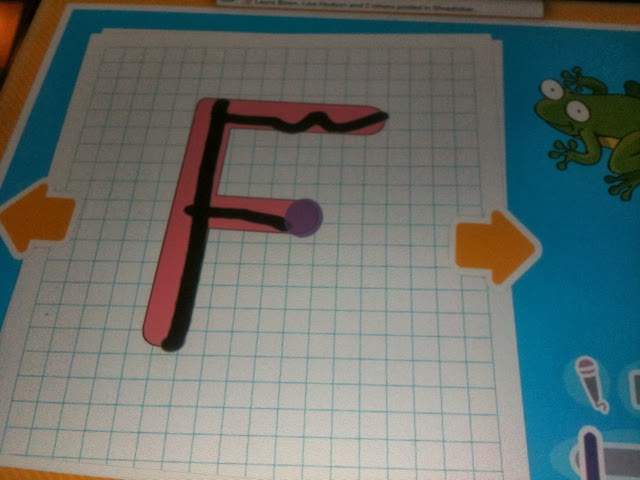
The next section was letters and numbers. There were a couple of different levels for each. The first letter game erased any mistakes and was very simple:


The circles show the child where to start writing from and where to go next. The second stage doesn't do so much correction on wobbly lines:


My son is a big numbers fan so having a couple of simple maths games is a good thing though I think he may already be well past the levels on this app. Firstly a simple counting game where the child clicks on the correct number and is awarded with a sweetie when right:


If a wrong answer is chosen then this little character pops up:


A full house of correct answers is rewarded with a celebration:


The second level is a game where the child has to click on the picture that matches the number:


Finally there is a games section though not all the games are as yet available. A shame as the racing game would appeal to my son! Meanwhile there is a scratch off game where you have to guess what is hiding:


I think this is a useful tool for helping children practice their writing and maths skills. There are also enough games to keep them amused whilst learning at the same time. Fine motor skills need plenty of practice and this has its place alongside pencil and paper.

Saturday, 17 August 2013

App Review: Savio Mingoville Fun Clock

Sponsored Post


I was asked if my children would like to try out Savio's Mingoville Fun Clock app for the iPad. As my son has been learning to tell the time at school I thought it would be a good thing to have. It has different games to help children learn how to tell the time:


The flamingo station master (my daughter didn't like his American accent) sets the challenges such as putting the numbers back on the clock in the correct position:


In each section the number of correct and incorrect attempts is recorded with green or red lights on the right hand side of the screen:


My 6 year old loves the games and had to be prised off the app the first few times he played it. He need a little help the first time he played as he rushed in without listening to the instructions and then got cross when it didn't work! Once he got the hang of it though he was pretty adept at it.

I like the fact that its a practical time teaching tool as its used for things like saying what time a bus will arrive. The animations are very well done too. I think this would make a great addition to the educational apps on your iPad or Android device and its reasonably priced too.

Tuesday, 29 January 2013

Tuesday App Review: Wheels on the Bus

Sponsored post

I was lucky to be sent a code for a new music app Wheels on the Bus which is designed as an introduction to music for 2-6 year olds. I let my 6 year old loose without any input from me. The app comes with several different sections:


The main music section introduces children to music by highlighting the note to press to play along with the sheet music for the wheels on the bus. As a tune that most children know its a good one to start with:


There is also an option to play the tune without the sheet music being shown. The next note isn't coloured in until you have pressed the first one.

For variety there is also a paint box option which allows them to colour in pictures of buses and either choosing colours or using the magic brush:


Like many games from P2 Games the child can also use stickers to create moving scenes:


Or they can do simple jigsaw puzzles:


To show off their musical skills they can record their own tunes too:


Not sure my son will be given a recording contract just yet! He had a great time playing with the app and I could see his speed of playing improving the more he did it. At only £1.49 Wheels on the Bus is a good value app for trying out your young ones musical talents and having other fun activities as well.

Monday, 3 December 2012

Monday App Review: Peppa Pig Theme Park

Sponsored post

We were sent a code to get a free copy of the latest Peppa Pig game from PS2 this time it's set in a theme park:


Up to 3 children can have a login for the game to savw their coins and stickers. Like Peppa games we have previously reviewed there are quite a few options for games inside the app:


My 6 year old's favourite was the bumper cars:


Whilst his big sister loves the music game:


Each game has simple instructions and easy controls which means its easy for a child to play. As they go they earn coins to spend in the shop on stickers to add to the scenes they can create:


A lovely game for Peppa Pig fans and one that is very simple. Slightly more than some games at £3.99 but it would get plenty of play.


Friday, 24 August 2012

Friday App Review: Peppa Pig's Sports Day

Sponsored Post

If your child is a Peppa Pig fan and inspired by the Olympics then this is a perfect app for your iPad or iPhone. It includes a range of sports events, ice cream making and rosette design. As an app aimed at young children all the controls and games are very simple,


Up to four players can choose their favourite characters to take part in the events. Then all they need to do is tap in their little circle to either make them go faster or jump.


The events are obstacle race, long jump, cycling and tug of war. After each event the winner is announced:


And trophy awarded:


For the ice cream making they have to tap on the ingredients and then stir:


My 5 year old played this at a party with lots of other children aged 2+. They all really enjoyed having a go together. This would definitely be a good addition to your apps collection if your child is the right age.